
How to Schedule Threads Posts (7 Best Tools in 2026)
Threads still doesn't let you schedule posts natively. Here are 7 tools that do, what they cost, and which one fits your workflow.
 Robert LigthartFounder of OmniSocialsPublished Updated 11 min read
Threads hit 275 million monthly active users in late 2025, according to Meta's Q3 earnings call. That number is still climbing. But the app still doesn't let you schedule posts.
Key takeaways
- All 7 tools in this guide publish to Threads: OmniSocials, Buffer, Later, Hootsuite, Metricool, Publer and Sprout Social.
- OmniSocials costs $10 per seat a month billed yearly ($12 monthly) and publishes to 13 platforms, including Threads, Bluesky and Mastodon.
- Buffer's free plan covers 3 channels with 10 scheduled posts per channel, and paid plans start at $5 per channel a month billed yearly.
- Hootsuite starts at $99 per user a month and Sprout Social at $79 per seat a month, both billed yearly (prices checked October 18, 2026).
- Later starts at $18.75 a month billed yearly and stopped publishing to X on August 28, 2025.
On this page
- Key takeaways
- Quick Picks
- How to Schedule Threads Posts (Step by Step)
- 1. Connect your Threads account
- 2. Compose your post
- 3. Pick your publish time
- 4. Review and schedule
- 7 Best Threads Scheduling Tools
- #1 - OmniSocials
- #2 - Buffer
- #3 - Later
- #4 - Hootsuite
- #5 - Metricool
- #6 - Publer
- #7 - Sprout Social
- Best Times to Post on Threads
- 3 Threads Scheduling Tips
- Match the tone
- Don't over-post
- Use cross-posting strategically
- So, What Is the Best Threads Scheduler?
- Frequently Asked Questions
- Can you schedule Threads posts?
- Does Threads have a built-in scheduler?
- What is the best free Threads scheduler?
- Can I cross-post from Instagram to Threads?
- What is the best time to post on Threads?
If you're managing a brand or building an audience on Threads, you're stuck posting in real time. Or you were, until third-party tools added Threads API support.
We compared 7 scheduling tools that work with Threads right now. This guide covers what each one costs, what it does well, and how to actually set up scheduled posting.
Quick Picks
Short on time? Here's the summary.
| Tool | Best For | Price | Threads Features |
|---|---|---|---|
| Tool: OmniSocials | Best For: Best value overall | Price: $10/seat/mo | Threads Features: Schedule, cross-post to 13 platforms |
| Tool: Buffer | Best For: Free plan users | Price: Free / $5/ch/mo | Threads Features: Schedule, basic analytics |
| Tool: Later | Best For: Instagram + Threads combo | Price: $18.75/mo | Threads Features: Visual planner, link in bio |
| Tool: Hootsuite | Best For: Enterprise teams | Price: $99/user/mo | Threads Features: Full suite, team workflows |
| Tool: Metricool | Best For: Analytics-focused users | Price: $20/mo | Threads Features: Deep performance data |
| Tool: Publer | Best For: Bulk scheduling | Price: $4/account/mo | Threads Features: Bulk upload, recycling |
| Tool: Sprout Social | Best For: Large agencies | Price: $79/seat/mo | Threads Features: CRM, advanced reporting |
(prices checked October 18, 2026, per month billed yearly)
How to Schedule Threads Posts (Step by Step)
The process is similar across all tools. Here's how it works.
1. Connect your Threads account
Open your scheduling tool and look for "Add account" or "Connect channels." Select Threads. You'll be redirected to log in through Instagram since Threads uses the same Meta account.
Grant the permissions the tool requests. This typically includes publishing posts and reading basic profile info.
Note: Threads uses Meta's API, so the connection goes through your Instagram account. You need a Threads account linked to Instagram for this to work.
2. Compose your post
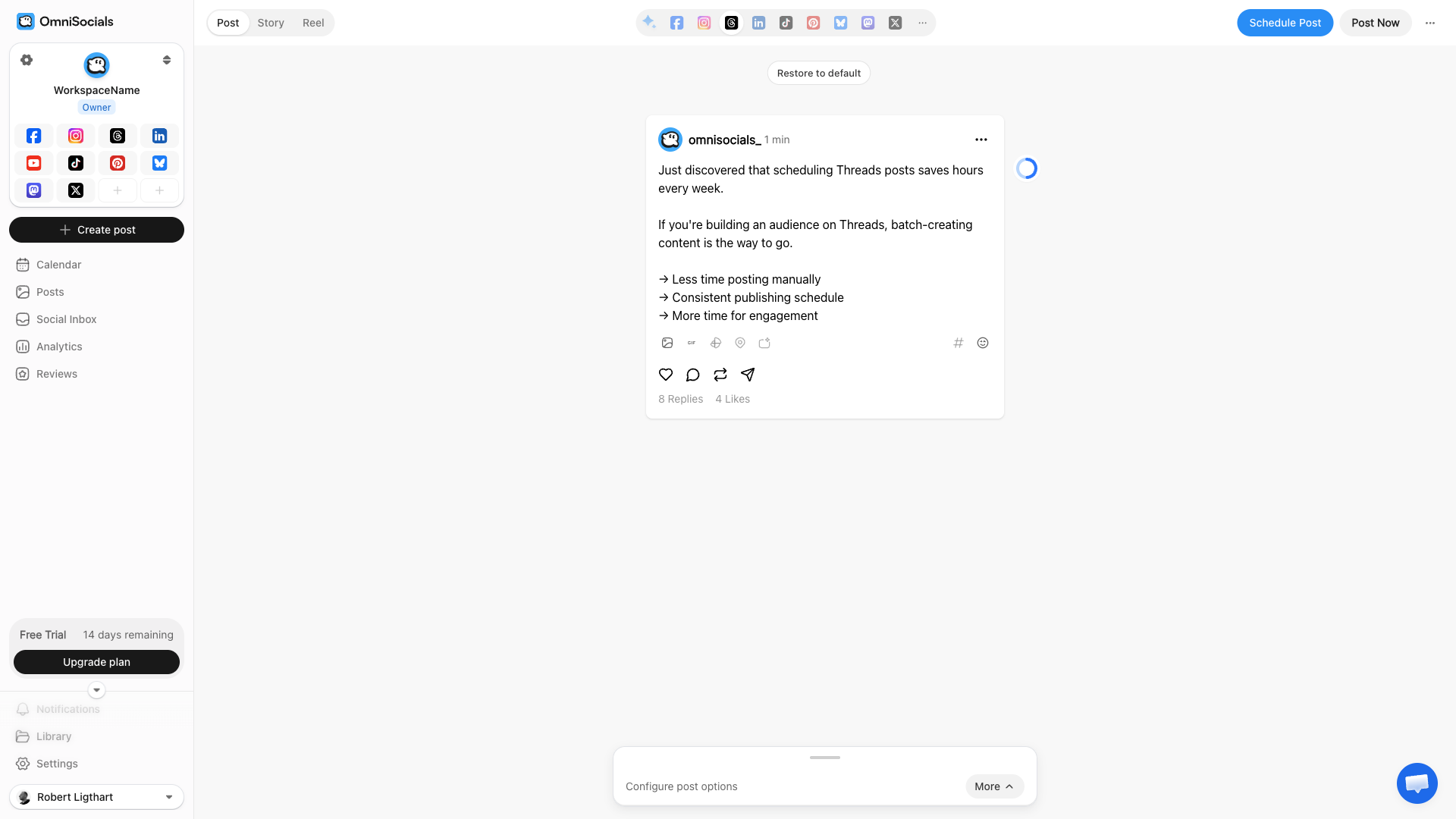
Write your Threads post in the scheduling tool's editor. Most tools show a live preview so you can see exactly how it'll look.
You can add:
- Text posts up to 500 characters
- Images (up to 10 in a carousel)
- Links with auto-generated previews
- Cross-platform posts to publish the same content to Instagram, X, or other platforms simultaneously
3. Pick your publish time
Choose when you want the post to go live. Some tools suggest optimal times based on your audience activity. If you're just starting out, check the best times section later in this article.
You can also add posts to a queue. Most tools let you set recurring time slots so you just write the post and it goes out at the next available slot.
4. Review and schedule
Double-check the content and time. Watch the time zone settings. Then hit schedule.
The tool handles the rest. It publishes automatically through the Threads API at the exact time you picked.
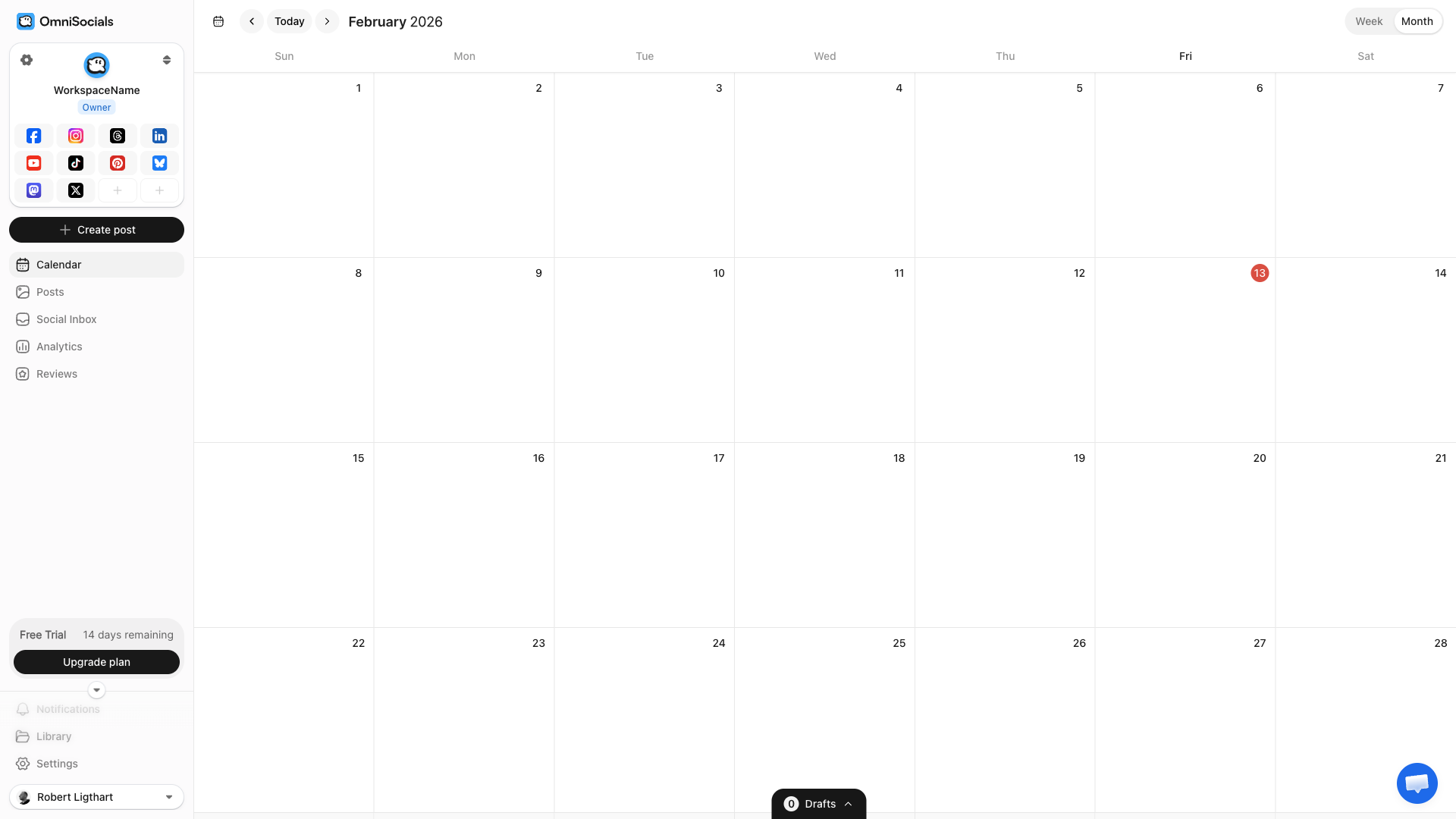
7 Best Threads Scheduling Tools
We compared each tool's own pricing page and help docs, checked on October 18, 2026, against the same criteria: Threads publishing, price, free plan or trial, inbox, team features and analytics. Here's what we found.
#1 - OmniSocials
OmniSocials is the best value option for scheduling Threads posts. You get 13 platforms for $10 per seat a month (billed yearly), with no per-channel fees.
The visual editor is clean and shows a real-time Threads preview while you compose. You can write one post and publish it to Threads, Instagram, Bluesky, X, LinkedIn, and 7 other platforms at the same time.
What I particularly like about OmniSocials is the unified inbox. Threads replies and mentions, Instagram DMs and comments, and X DMs all show up in one stream. It covers 7 platforms (Instagram, Facebook, LinkedIn Pages, TikTok, YouTube, X and Threads), not Bluesky or Mastodon. For anyone managing multiple platforms, this saves a lot of tab-switching.
Key Features
- 13 platform support including Threads, Bluesky, Mastodon, and all the major networks
- Visual post editor with per-platform previews
- Unified inbox for 7 platforms, including Threads replies and mentions
- Media library with built-in Pexels and Unsplash access
- Calendar view for planning content across platforms
- Approval workflows for client or team review
Pros
- $10/mo per seat (billed yearly), regardless of how many platforms you connect
- Clean, fast interface with minimal learning curve
- Supports Bluesky and Mastodon (most tools still skip Mastodon)
- 14-day free trial
Cons
- Newer product, smaller user community than established tools
- Analytics are improving but not yet as deep as Metricool or Sprout Social
Pricing
$10 per seat a month billed yearly, or $12 billed monthly. A seat is one workspace (one brand) or one extra teammate. 14-day free trial.
#2 - Buffer
Buffer is one of the most recognized names in social media scheduling. Threads is one of the 12 channels it supports, on every plan including Free.
Their free plan gives you 3 channels with up to 10 scheduled posts per channel. That's enough to test Threads scheduling without paying anything.
The interface is intentionally simple. If you've never used a scheduling tool before, Buffer is probably the easiest starting point.
Key Features
- Clean, minimal UI that's easy to learn
- Free plan with 3 channels and 10 posts each
- AI assistant for caption suggestions
- Link in bio page builder (Start Page)
- Insights on every plan (30 days on Free)
Pros
- Genuinely useful free plan
- One of the easiest tools to learn
- Threads publishing on every plan, including Free
- Good mobile app
Cons
- Per-channel pricing adds up fast ($5/channel/mo on Essentials, $10 on Team, billed yearly)
- Free plan keeps only 30 days of insights
- Community inbox handles comment replies, not DMs
- Lacks advanced features like bulk scheduling and content recycling
Pricing
Free plan (3 channels, 10 scheduled posts per channel, 1 user). Essentials is $5 per channel a month and Team (unlimited team members, approval workflows) is $10 per channel a month, both billed yearly. 5 channels on Essentials = $25/mo. 14-day free trial on paid plans.
#3 - Later
Later started as an Instagram-first scheduling tool, so the Instagram + Threads combo is where they shine.
Their visual content calendar is excellent. You drag and drop posts to reschedule them, and the grid planner shows exactly how your Instagram feed will look. Threads posts can be scheduled alongside your Instagram content from the same view.
If your strategy is built around Instagram with Threads as a secondary channel, Later is a strong fit.
Key Features
- Visual content calendar with drag-and-drop
- Instagram grid planner for feed aesthetics
- Link in Bio for driving traffic from Instagram
- User-generated content tools for collecting and reposting
- Hashtag suggestions powered by analytics
Pros
- Best visual planning experience for Instagram + Threads
- Strong media management and content library
- Good analytics on Instagram performance
- Link in Bio is one of the better link-in-bio tools
Cons
- Focused heavily on Instagram. Other platforms feel like add-ons.
- Pricing starts at $18.75/mo billed yearly ($25 monthly), with 30 posts per profile a month on Starter
- No X support since August 28, 2025, and LinkedIn analytics cover personal profiles only
- Social Inbox only on Growth and up, and it covers Instagram, Facebook and TikTok, not Threads
Pricing
Starter $18.75/mo billed yearly ($25 monthly). Growth $37.50/mo ($50 monthly). Scale $82.50/mo ($110 monthly). 14-day free trial.
#4 - Hootsuite
Hootsuite is the enterprise standard. It does everything. Threads scheduling, team collaboration, social listening, advanced analytics, ad management.
But that power comes at a price. Plans start at $99 per user a month (billed annually) and the interface can feel overwhelming if you just need to schedule a few Threads posts.
If you're running a large team or managing social for multiple brands, Hootsuite's workflow tools justify the cost. For solo users and small teams, it's overkill.
Key Features
- Comprehensive platform covering scheduling, monitoring, ads, and reporting
- Team collaboration with approval workflows (Advanced plan) and task assignments
- Social listening for brand mentions and keywords
- Wisdom, Hootsuite's AI, for content generation
- Canva integration built into the composer
Pros
- Supports almost every social platform including Threads
- Advanced team features and permissions
- Deep analytics and custom reporting
- Excellent for agencies managing many client accounts
Cons
- $99 per user/month minimum (billed annually) is expensive for small teams
- Interface is cluttered and has a steep learning curve
- Sold per user, so a team of 3 on Standard is $297/mo
- Many features locked behind higher tiers
Pricing
Standard is $99 per user a month (10 social accounts). Professional is $199 per user (unlimited accounts, custom reports). Advanced is $399 per user (approvals, message assignment and routing). Enterprise pricing is custom. All billed annually, with a 14-day free trial and no free plan.
#5 - Metricool
Metricool is the tool to pick if analytics matter more to you than anything else.
Their Threads analytics go deeper than most competitors. You get engagement rate breakdowns, follower growth charts, best posting time suggestions based on your actual data, and competitor benchmarking.
The scheduling interface is straightforward. Not the most polished, but functional. Where Metricool really separates itself is the data it gives you after you post.
Key Features
- Deep analytics across all platforms including Threads
- Competitor analysis to benchmark your performance
- Best time to post based on your audience data
- Hashtag tracker for monitoring hashtag performance
- Ad management for Meta and Google ads
- SmartLinks bio link tool
Pros
- Best analytics of any mid-priced tool
- Competitor benchmarking included on all paid plans
- Free plan available (limited but useful)
- Strong reporting for client presentations
Cons
- UI is functional but not as polished as Buffer or Later
- Free plan is very limited (1 brand, 20 posts a month, no LinkedIn or X)
- Scheduling features are solid but not innovative
- Learning curve for the analytics dashboard
Pricing
Free plan available (1 brand, 20 posts a month). Starter from $20/mo billed yearly ($25 monthly) for up to 5 brands. Advanced from $53/mo billed yearly ($67 monthly). Custom plans through sales. X is a $10/month add-on per connected account.
#6 - Publer
Publer is a budget-friendly option with a few standout features that larger tools don't offer.
The bulk scheduling feature is particularly useful. You can upload a CSV of posts and schedule weeks of Threads content in minutes. They also have content recycling, which automatically re-queues your best posts.
For the price (from $4 a month per account, billed yearly), you get a lot of functionality.
Key Features
- Bulk scheduling via CSV upload
- Content recycling for evergreen posts
- Auto-scheduling fills your calendar with optimal times
- Workspaces for managing multiple brands
- Browser extension for quick sharing
- Canva integration for creating visuals
Pros
- Affordable, from $5 a month for one account ($4 billed yearly)
- Bulk scheduling saves serious time
- Content recycling is great for evergreen content
- Free plan with 3 social accounts (no X) and 10 scheduled posts per account at a time
Cons
- Interface feels dated compared to Buffer or Later
- Analytics are basic on lower plans
- No unified social inbox (comment replies happen from the calendar)
- Fewer integrations than larger competitors
Pricing
Free plan available (3 accounts). Professional from $4/mo billed yearly ($5 monthly) for 1 social account. Business from $8/mo billed yearly ($10 monthly). Each extra account or team member adds to the price.
#7 - Sprout Social
Sprout Social is the Rolls-Royce of social media management. The analytics, the CRM features, the social listening, the reporting. It's all top-tier.
But the pricing reflects that. Plans start at $79 per seat a month (Essentials, billed yearly), but Essentials has no inbox. The inbox starts on Standard at $199 per seat. If you're a solo founder or small team, this is not the tool for you.
If you're an agency managing enterprise clients who need detailed ROI reports and social CRM integration, Sprout Social is the gold standard.
Key Features
- Social CRM linking social interactions to customer profiles
- Advanced reporting with custom dashboards and export
- Social listening with sentiment analysis
- Smart inbox with automated routing and tagging (Standard and up)
- Advocacy tools for employee social sharing
- Chatbot builder for automated responses
Pros
- Most comprehensive analytics and reporting available
- Social CRM is unique and powerful
- Excellent customer support
- Best-in-class social listening
Cons
- $199 per seat a month on Standard (billed yearly), the first plan with the inbox. A team of 3 costs $597/mo.
- Overkill for small businesses and solo users
- Steep learning curve
- Some features feel like they exist to justify the price
Pricing
Essentials at $79/seat/mo (up to 5 profiles, no inbox). Standard at $199/seat/mo. Professional at $299/seat/mo. Advanced at $399/seat/mo. All billed yearly; monthly billing is $99, $249, $399 and $499. Enterprise pricing is custom. 30-day free trial.
Best Times to Post on Threads
Threads is still young, so timing data is less established than Instagram or X. But early patterns are emerging.
Based on data from our best time to post guide and SocialPilot's analysis:
| Day | Best Times (ET) |
|---|---|
| Day: Monday | Best Times (ET): 8-10 AM, 6-8 PM |
| Day: Tuesday | Best Times (ET): 9-11 AM, 7-9 PM |
| Day: Wednesday | Best Times (ET): 10 AM-12 PM (peak day) |
| Day: Thursday | Best Times (ET): 8-10 AM, 6-8 PM |
| Day: Friday | Best Times (ET): 9-11 AM |
| Day: Saturday | Best Times (ET): 10 AM-12 PM |
| Day: Sunday | Best Times (ET): 5-7 PM |
Wednesday and Thursday mornings consistently show the highest engagement. This lines up with Instagram patterns, which makes sense since the audiences overlap significantly.
Evenings between 6-8 PM are a strong secondary window on weekdays.
These are aggregate numbers. After 2-3 weeks of posting, check your own analytics to find when your specific audience is most active. Metricool and Sprout Social both offer personalized best-time suggestions.
3 Threads Scheduling Tips
Match the tone
Threads has a more conversational vibe than Instagram. The audience skews toward text-first discussion rather than polished visuals. Your scheduled posts should reflect that.
Don't just repurpose Instagram captions as Threads posts. Write for the platform. Ask questions. Share opinions. Start conversations.
Don't over-post
Threads' feed blends algorithmic and chronological signals. Posting too often can hurt rather than help. The engagement data so far suggests 1-3 posts per day is a good range.
Space your scheduled posts at least 3-4 hours apart.
Use cross-posting strategically
Most scheduling tools let you publish to Threads and Instagram simultaneously. You can also cross-post to Bluesky and Mastodon from the same tool. This is convenient, but use it carefully.
The same post can work on both platforms, but often a slight tweak makes a big difference. Threads posts can be more casual, more opinionated, and more text-heavy than Instagram captions.
If your scheduling tool supports per-platform text customization, use it.
So, What Is the Best Threads Scheduler?
It depends on what you need.
OmniSocials is the best option for most users. You get 13 platforms for $10/mo, including Threads, Bluesky, and Mastodon. If you're managing multiple social accounts and want one tool that covers everything without per-channel fees, it's hard to beat on value.
If you're on a tight budget, Buffer's free plan works well for getting started with Threads scheduling. Three channels, 10 posts each, no cost.
For Instagram + Threads users who care about visual planning, Later is the strongest choice. Their visual calendar and grid planner are excellent.
If analytics are your priority, Metricool gives you the deepest performance data at a reasonable price. Their competitor benchmarking is a nice bonus.
Hootsuite and Sprout Social are enterprise tools. They do everything, but they start at $99 per user and $79 per seat a month respectively (billed yearly), and Sprout's inbox needs the $199 Standard plan. Only worth it if you need team workflows, social listening, or advanced reporting.
Publer is a solid budget pick, from $4 a month per account billed yearly, especially if you do a lot of bulk scheduling or content recycling.
Frequently Asked Questions
Can you schedule Threads posts?
Yes, but not natively inside the Threads app. You need a third-party scheduling tool like OmniSocials, Buffer, Later, or Hootsuite. These tools connect to Threads through Meta's API and publish posts automatically at your scheduled time.
Does Threads have a built-in scheduler?
No. As of February 2026, Threads does not have a native scheduling feature. Meta has not announced plans to add one. You need to use a third-party tool to schedule Threads posts in advance.
What is the best free Threads scheduler?
Buffer offers a free plan that includes Threads scheduling for up to 3 channels with 10 posts per channel. OmniSocials offers a 14-day free trial with full access to all 13 platforms including Threads.
Can I cross-post from Instagram to Threads?
Some scheduling tools let you publish the same post to both Instagram and Threads simultaneously. OmniSocials, Buffer, and Later all support cross-posting between the two platforms from a single compose window.
What is the best time to post on Threads?
Based on early engagement data, the best times to post on Threads are weekday mornings between 8-10 AM and evenings between 6-8 PM in your audience's time zone. Wednesday and Thursday tend to see the highest engagement.
Try OmniSocials for 14 days
Plan, schedule and answer on 13 platforms from one calendar, or let your AI agent do it. The first charge comes when the trial ends.


